
How to register
Traditional Units (Packs, Troops, Crews and Ships)
MBC and District Registrations
- Click here for the Spirit of Adventure Merit Badge Counselor (MBC) information form
Note 1:
If you are currently a registered leader in the Spirit of Adventure Council, the MBC information form must be approved by a unit Key 3 (you cannot approve your own form). Please email the completed form to membership@scoutingboston.org.
Note 2:
If you are not currently a registered leader in the Spirit of Adventure Council, the MBC form must be approved by the district advancement chair. Please email the completed form to the district advancement chair, and membership@scoutingboston.org.
You will also need to complete:
- Safeguarding Youth Training (see link above)
- SoA CORI JotForm (see link above)
- An online adult application (you will receive the link once the MBC form has been received)
If you have any questions or do not receive the application link, please email membership@scoutingboston.org.
Fee:
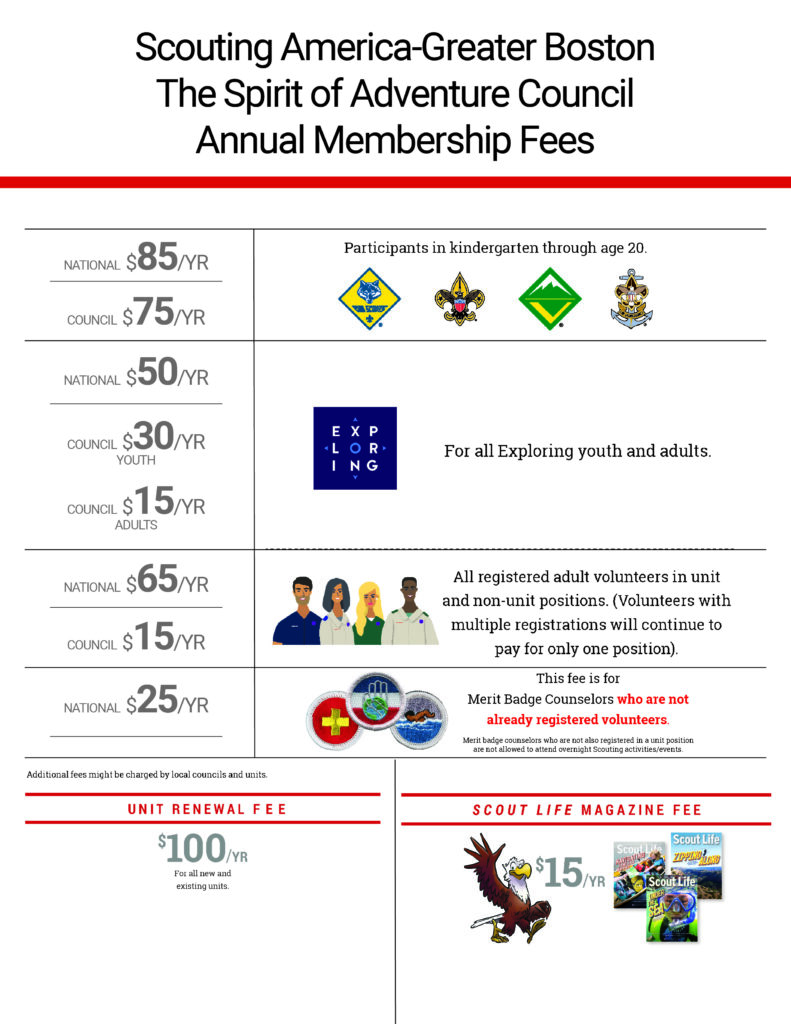
The fee to register as a Merit Badge Counselor only is $25.00 + 3% admin fee. If you are being charged $65.00, the incorrect position was selected during the application process.
District Advancement Chairs:
- Flintlock District – Joshua Kline (jkline511@gmail.com)
- Great Blue Hill District – Robert Wanamaker (rwana55@yahoo.com)
- Great Eastern District – Gregory Paul (gdtapaul@verizon.net)
- Northern Light District – Joshua Huston (josh.huston@gmail.com)
- Sons of Liberty District – Scott Barvick (sbarvick@comcast.net)
- West Wind District – Neil Thomas (wwadvancementchair@gmail.com)
District Chairs (for registration inquiries):
- Flintlock District - Peter Ricci (riccistuff@verizon.net)
- Great Blue Hill District – Francis Campion (francis.campion@gmail.com)
- Great Eastern District – Gordon Forrest (gef_home@hotmail.com)
- Northern Light District – Harvey Ing (harvey.ing@verizon.net)
- Sons of Liberty District – John Tumblin (jtumblin@gmail.com)
- West Wind District – Sarath Krishnaswamy (sarath@alum.mit.edu)
How to transfer/multiple
BeAScout Pin Set-up
Invitation Manager
Safeguarding Youth Refresher Training
The new Safeguarding Youth Refresher Training has launched to help you renew this annual required training.
If you have completed the full Safeguarding Youth Training (SYT) course and it is currently active or has expired within the last 7 days, you are eligible to take the Refresher Training.
If your full SYT training has been expired for 7 days or more, you will need to complete the full Safeguarding Youth Course again before receiving credit.
Participants taking the Refresher Training must successfully pass the exam on the first attempt to receive credit for the Y01 training code. If the exam is not passed, the system will automatically route you to the full Safeguarding Youth Course to ensure a complete review of the material. Once the refresher exam is failed, the refresher course cannot be relaunched, and the full course must be completed.
The Safeguarding Youth Refresher Training will be available in English and Spanish.
Folks that still have active YPT and have not taken the new SYT will need to do so by 5/31 regardless of when the 2-year expiration is.
New Safeguarding Youth Training
Scouting America has unveiled a new comprehensive Safeguarding Youth Training (SYT) program (Formerly known as Youth Protection Training or YPT), reinforcing its unwavering commitment to creating the safest possible environment for young people. This updated training represents a significant step forward in Scouting America's multi-layered approach to youth protection
The new training is mandatory for all registered adult volunteers and has been developed with insights from leading experts in child safety, law enforcement, and child psychology. It incorporates the latest strategies for recognizing, responding to, and preventing various forms of abuse, including emotional, physical, and sexual abuse.
Key Features of the Updated Training:
- Comprehensive Focus: Our new Safeguarding Youth Training (formerly Youth Protection Training) program reflects the more comprehensive nature of the training and its focus on safeguarding youth from all threats.
- Inclusive Content: The training covers a wide range of topics, ensuring volunteers are well-informed about potential risks and best practices for youth protection.
- Annual Refresher Courses: Recognizing the ongoing need for education and awareness, Scouting America will now require annual refresher courses, estimated to take 15-20 minutes, to keep youth protection knowledge current.
- Alignment with Best Practices: Scouting America regularly consults with experts to ensure its policies and training reflect the most up-to-date knowledge and prevention techniques in the field of youth safety.
- Focus on Prevention: The training emphasizes proactive measures to prevent abuse and create a culture of safety within Scouting.
The new SYT is to be renewed on an annual basis. Your existing Youth Protection Training remains valid until its expiration date, at which point the new Safeguarding Youth Training will be required.
Scouting America's proactive approach to youth safety underscores its dedication to providing a secure and enriching environment where young people can learn, grow, and thrive. The launch of this enhanced Safeguarding Youth Training demonstrates a continuous effort to adapt and improve safety measures, ensuring the well-being of all Scouts remains the top priority.
To take SYT, log into www.my.scouting.org and hit the Safeguarding Youth button on the home page.
Safeguarding Youth Suspension Policy
Online Registration FAQs
Who can submit an online application?
Online applications can be submitted for new, returning or transferring Scouts. This includes out-of-council transfers within the United States.
Who can review and approve online applications?
Youth: online youth applications can be approved by the unit Key 3.
Adult:
Here is the order in which an adult applicant should follow:
- Complete safeguarding youth training
- Complete the online SoA CORI form and upload their ID at this secure link https://hipaa.jotform.com/232543180609050
- Forward confirmation email received (upon completion of the SoA CORI form) to the committee chair
- Complete the online application
Unit steps after the applicant completes the above steps.
The committee chair needs to do:
- Under application notes - note the position the adult should be registered in.
- Under application notes - confirm that the adult has done the online SoA CORI form and provided a copy of the ID.
- Select Recommend in application manager (this should only be done when steps 1 and 2 have been completed).
After the above steps are completed then the CoR (or CoR delegate) will have to assign the position and approve the application.
We will not be notifying units when a CORI result has been received, so as long as the applicant and committee chair have followed the above steps, the CoR can accept the online application.
If we do not receive the SoA CORI and ID and the application is accepted, the applicant will be suspended until such time that we receive the SoA CORI and ID and have received the results.
If we receive a negative result on a CORI resulting in the adult not being able to be registered the appropriate unit leaders will be notified.
NOTE: To assign the positions of unit leader (cubmaster, scoutmaster, etc) or committee chair there cannot currently be anyone listed in those positions.
If the online application is for one of these positions the CoR can move the previous person out prior to accepting the online application (and then wait 24 hours) or they can accept the online applicant in a different position and 24 hours after accepting, it do the necessary position changes (see attached instructions)
How can I approve a pending online application?
Pending online applications can be found under the application manager.
To access application manager, the unit Key 3 will need to log on to my.scouting.org (from the Main Menu: Select Unit; Select Application Manager; Select the application; Review and Accept).
Once an online application is approved, how long will it take for that Scout to appear in Scoutbook?
Once an online application is approved/processed, the system will automatically add the member to Scoutbook. The system is designed to sync the new member to Scoutbook and my.scouting.org within 24-48hrs.
To avoid errors, the unit should not manually add new members to Scoutbook’s advancement record-keeping system.
How can official unit roster be downloaded?
The unit Key 3 can download an official unit roster by logging into their my.scouting.org (select Menu; select Unit; select Roster; select Download).
Anyone missing in the official unit roster is not registered and will need to complete an online application. Recently approved online applications will take 24-48hrs to sync the new member to the unit roster.
What should I do if I received an error message when registering online?
If you are trying to register a youth and have received an error message, please contact membership@scoutingboston.org.
Changing positions online?
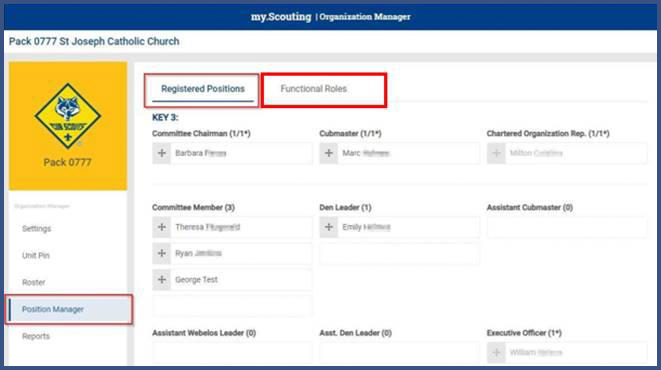 No paperwork required - can be done online by the Chartered Org Rep.
The Chartered Org Rep logs into their my.scouting.org account
- From MENU selects the unit
- Selects ORGANIZATION MANAGER
- Selects POSITION MANAGER (on the left)
Clicks on an individual and moves them to their new role; if no longer with the unit, then I would recommend Unit Scouter Reserve
NOTE: If changing unit leaders (Cubmaster, Scoutmaster) or Committee Chair they must be moved to new role first and then the person who is going to become the new unit leader or committee chair can be moved into that role.
- Scroll down and select SAVE
The system will display a success message along with a reminder of it taking 24 hours for the change to take effect.
Did you know that there are different ways to register online?
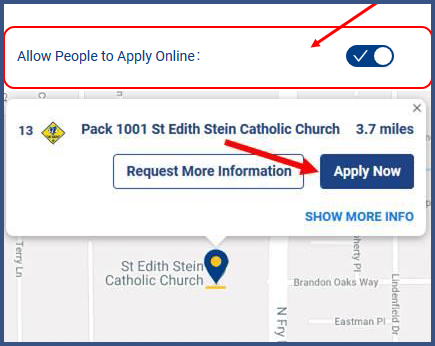 1. BeAScout.org is another way families can register online by utilizing the Apply Now button located in the BeAScout.org unit pin! The unit Key 3 can activate or deactivate the Apply Now button from their my.scouting.org (select Menu; Organization Manager; Unit Pin; Select Allow People to Apply Online – Save Changes.)
The unit can also choose to send an Application Invite from their my.scouting.org account (Invitation Manager) to someone who has requested more information about your unit while visiting BeAScout.org. Each application invite has a specific URL that will allow families to register online. (Invitation Manager Tutorial Videos)
2. The unit leaders may choose to share a unique URL or QR code with families who would like to register online.

The QR code is scannable – simply hold a phone’s camera up to the QR Code & it will take applicants to your unit’s online registration link. These links are specific and unique for each unit. Your unit’s QR CODE and online registration URL Link can be found in Invitation Manager in my.scouting.org (select Menu; select unit; select Invitation Manager; the QR Code and URL are at the center of the page.) Just copy, paste the QR code and share with families that are ready to apply.
What if I don't know my my.scouting.org user name or password?
Select FORGOT USERNAME/PASSWORD. You will need to know either your member ID or email associated with the account to recover your username. You will need to know your username to recover your password. When recovering your username, if it finds an account that may be yours, it will show on the next screen. If there is more than one, select the one that is yours and select RETRIEVE SELECTED ACCOUNT. On the next screen, you will be asked security questions, or you can choose personal information. Answer the questions and if there is an account, you will receive your username.